How To Enroll
Open Enrollment is November 2-13, 2026!
Open Enrollment Toolkit
-
What's Changing with Benefits?
- Jones will continue to offer FREE short-term disability, supplemental cancer benefits, and $15,000 in life insurance.
- For FSA Medical participants, Jones will contribute $25 in addition to your annual election.
- Vision, voluntary life, critical illness, and long-term disability rates will remain the same.
-
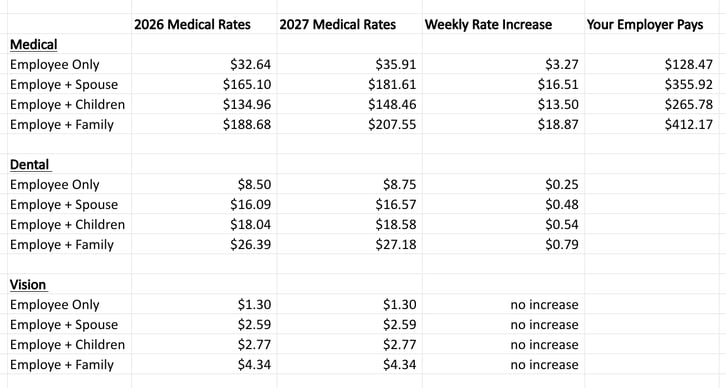
Employee Weekly Contributions | Medical and Dental
-
What should I do BEFORE Open Enrollment?
- Login to Dayforce (Company=Jones)
- Update your personal info by clicking
your “PROFILE”, so you don’t miss out on important benefits info! - Click “BENEFITS” to review your current benefits.
-
Review the 2026/2027 Benefits Summary Comparison to compare new 2027 rates to last year's rates
-
Review the 2027 Benefits Guide to prepare to make your benefits selections.
- Login to Dayforce (Company=Jones)
-
How To Enroll
-
Review the 2027 Jones Benefits Guide to prepare to make your new benefits selections
-
Login to Dayforce. (Company=Jones)
-
Click on "Benefits."
- Select "Start Enrollment" and complete.
-
Additional Resources
-
2027 Benefits Guide
View: 2027 Benefits Guide
-
What's New for 2027
Check out this flyer to review what's new in your benefits plan for 2027!
-
2026/2027 Benefits Summary
View: 2026/2027 Benefits Summary
-
Enrollment Step-By-Step Guide | Desktop and Dayforce App
You can complete Open Enrollment through the web or the DayForce app!
Click Here to view a step-by-step guide to completing Open Enrollment on your desktop.
Click Here to view a step-by-step guide to completing Open Enrollment on the Dayforce App.
-
FAQ
Where do employees go to complete open enrollment?
Dayforce:
- Log in to https://www.dayforcehcm.com/ Company = Jones
- Go to Benefits>Benefit enrollments
- Select Open Enrollment and complete
When will benefits changes take effect?
January 1, 2027
What is considered a qualifying life event?
Qualifying life events allow you to enroll in benefits outside of the Open Enrollment window.
Qualifying Life Events:
- Getting Married
- Getting Divorced
- Having or Adopting a Baby
- Death of Someone Who Shares Your Health Plan
- Earning US Citizenship
- Turning 26
- Turning 65
- Experiencing a Shift in Employment Status
- Loss of Health Insurance
- A Spouse's Open Enrollment Period
What if my spouse has Open Enrollment after Jones?
A spouse’s open enrollment is a qualifying enrollment that allows you to make changes outside of open enrollment. For example, if your spouse has open enrollment in January, that allows you to make changes mid plan year.
Who do employees talk to if they have questions about Open Enrollment?
Employees should contact their company HR Liaison with any questions regarding Open Enrollment.
Open Enrollment is currently closed.
Employees have 31 days from the Qualifying Life Event date to make benefit changes and must provide the appropriate documentation.
If you have experienced a qualifying life event and would like to enroll or change your benefits plan, please contact your HR Liaison.
Qualifying Life Events:
- Getting Married
- Getting Divorced
- Having or Adopting a Baby
- Death of Someone Who Shares Your Health Plan
- Moving to a New Area
- Earning US Citizenship
- Turning 26
- Turning 65
- Experiencing a Shift in Employment Status
- Loss of Health Insurance
- A Spouse's Open Enrollment Period